The Complete Guide to Instagram DM Automation [2026]
![The Complete Guide to Instagram DM Automation [2026]](https://api.directreply.top/media/blog/featured/2026/07/cb1fd75bed4146e7a6d5a549c3ed54e3.webp)
Every day, thousands of potential customers send Instagram DMs to businesses — asking about prices, placing orders, requesting information. Most businesses share the same problem: DMs that go unanswered for hours.
According to HubSpot research, 82% of customers expect an immediate response within 10 minutes. When you don't reply fast enough, they move on — usually to a competitor.
This guide covers everything you need to know about Instagram DM automation:
- Understanding Instagram DMs: types and inbox structure
- Instagram's built-in auto reply — and its real limitations
- Professional DM automation with keyword triggers
- Comment auto reply for posts
- Story reply automation
- Follow Gate strategy
- Best practices and tool comparison
Understanding Instagram DMs
Before setting up automation, you need to understand how the Instagram DM inbox is structured.
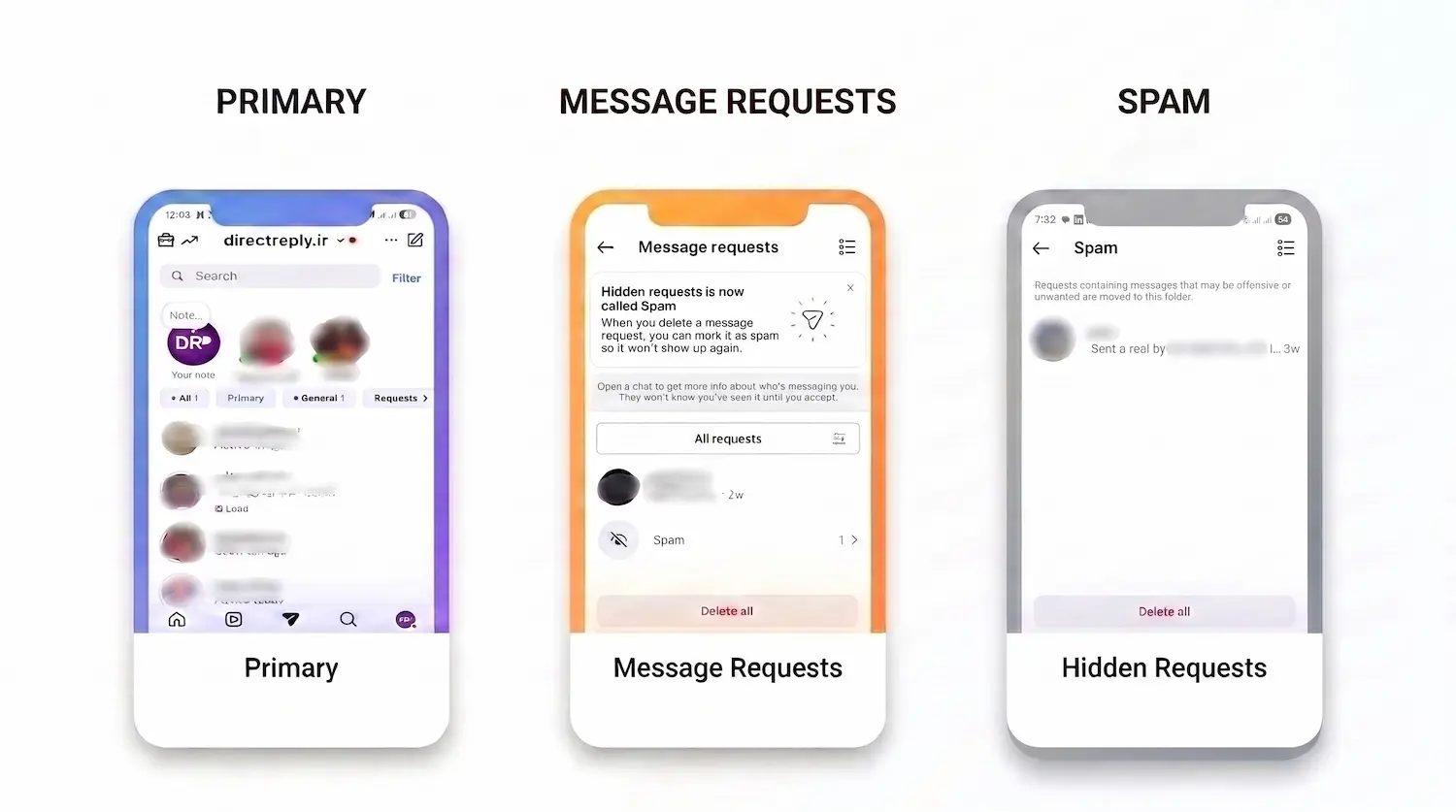
Primary Inbox
When you open Instagram DMs, you'll see two tabs within the main inbox: Primary and General.
- Primary: Messages from people you follow or who follow you land here. This is where your active customers and loyal followers communicate with you — your highest-priority conversations.
- General: Messages Instagram determines aren’t spam, but come from people who don’t follow you. New potential customers or acquaintances often end up here.
Message Requests
When someone who doesn't follow you sends a DM, it lands in Message Requests, waiting for your approval. This section is critical for businesses: most new potential customers come from here.
Key fact: Professional automation tools like Direct Reply can auto-reply to Message Requests before you've accepted them — so you never miss a lead.
Not sure why some messages don't appear in Primary? In our guide to Primary, General, and Message Requests on Instagram, we explain where different messages go and how Message Requests and Hidden Requests work.
Spam (formerly Hidden Requests)
Messages Instagram’s algorithm flags as potential spam. Instagram recently renamed this section from “Hidden Requests” to Spam. These messages are hidden by default and you have to manually navigate to find them.
Instagram DM Settings for Professional Accounts
If you have a Professional account (Business or Creator), you have access to additional messaging controls. To find them:
- Profile → ☰ (menu) → Settings and Privacy
- Messages and Story Replies
Message Controls
You can control who is allowed to send you DMs. Options:
- Everyone — anyone can message you (recommended for businesses)
- People You Follow — only accounts you follow can DM you
- Off — no one can send you DMs
For businesses, always select Everyone so potential customers can reach you.
Message Requests Filter
You can configure which Message Requests skip the queue and go directly to your Primary inbox — for example, messages from people with mutual followers.
Story Replies
Control who can reply to your stories. For maximum engagement and automation coverage, select Everyone.
Instagram's Built-in Auto Reply (Away Message)
Instagram offers a native auto-reply feature — often called Away Message or Instant Reply. You can find it under Professional Dashboard, in the Messaging Tools section (exact path varies by app version).
It looks useful at first glance, but it has significant limitations:
- Single static message: You can't send different responses based on what the user wrote
- No keyword matching: Can't say "if they mention 'price', send this reply"
- Limited to off-hours: In most configurations, only activates outside your set business hours
- No analytics: No way to track how many people received it or what they asked
- No interactive buttons: Can't include clickable action buttons in the reply
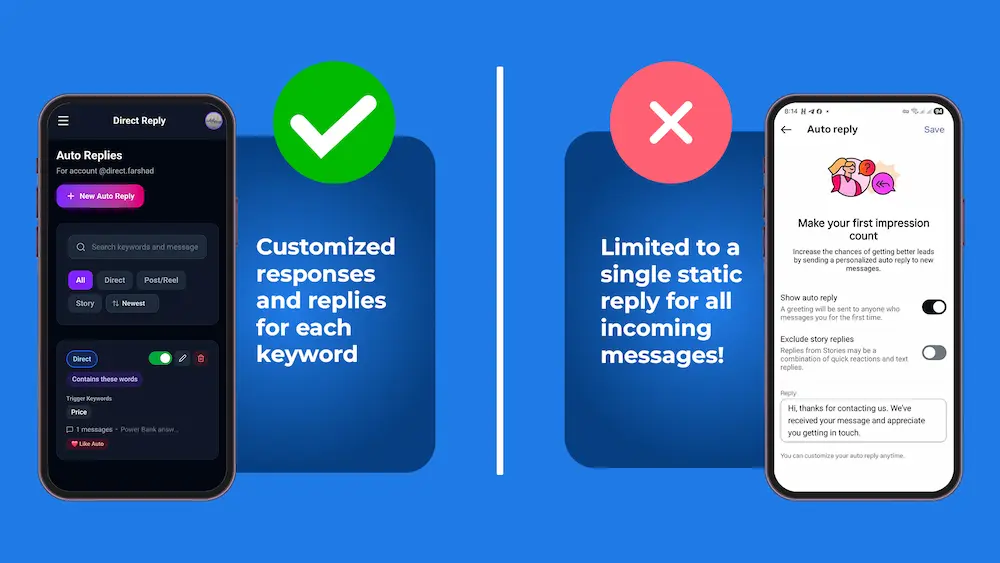
For accounts receiving a handful of DMs per day, Away Message may be enough. But if your business is growing and you're handling dozens or hundreds of DMs daily, you need something more powerful.
Professional DM Automation with Direct Reply
Tools like Direct Reply take Instagram DM automation to a completely different level. The key differentiator: Direct Reply uses the Official Instagram API, which means:
- Your account is never at risk — no browser simulation, no password sharing
- Connection via OAuth (like "Login with Google") — Instagram explicitly authorizes this
- Compliant with Instagram's Platform Policy
For a step-by-step walkthrough of setting up your first rule, see our guide on how to auto reply to Instagram DMs.
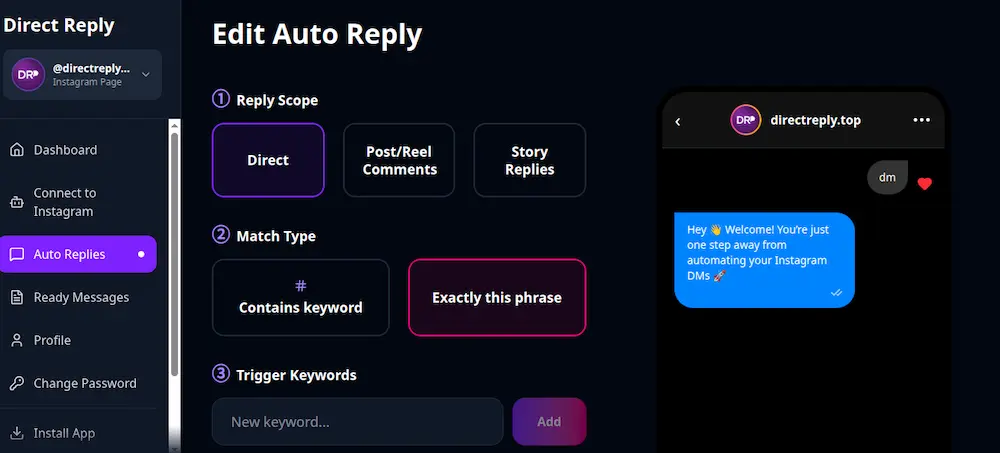
How Rules Work in Direct Reply
Each automation rule (called an Activator) has three main components:
Scope — Where does it trigger?
- Direct: When someone sends your page a DM
- Post: When someone comments on a specific post
- Story: When someone replies to a specific story
Type — How is the keyword matched?
- Exact: The message must be exactly the keyword (e.g., only the word "price")
- Contain: The message only needs to contain the keyword (e.g., "what's your price?" matches "price")
Keywords
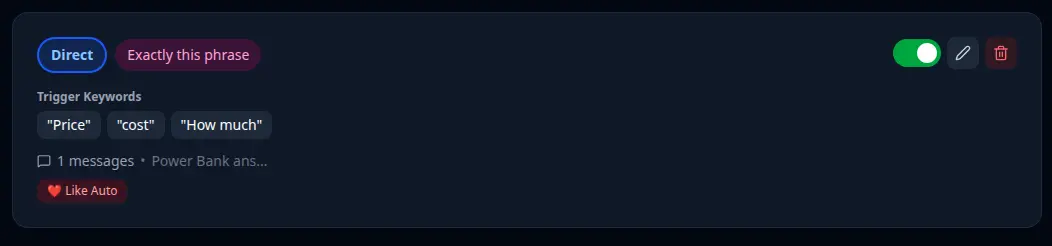
Each rule supports up to 10 keywords. For example, a clothing store might use: "price", "cost", "how much", "pricing", "rate", "charge".
Want to learn more about keyword automation, the difference between Exact Match and Contain Match, and how to choose the right keywords? Read our complete guide to Keyword Trigger in Instagram Direct .
Response Messages
You can chain multiple messages in sequence — a greeting first, then product info, then a CTA button with a direct link.
Keyword-Triggered DM Automation — Real Example
Let's say you run an online clothing store. A user DMs: "Hi, how much are your jackets?"
Direct Reply receives the message, matches the "Contain + keyword: price" rule, and within seconds sends:
- A DM: "Hey! Here are our jacket prices: Casual jacket $89, Rain jacket $120, Winter jacket $149. Ready to order? 👇"
- A button message: "Shop Now" with your store URL
All without you being there. The customer gets an answer in seconds; you get a conversion opportunity automatically tracked in your inbox.
Instagram Comment Auto Reply
One of the most powerful features of Direct Reply is automatic replies to post comments. When a user comments on a specific post, two things happen simultaneously:
- DM sent: The user instantly receives a direct message with your full response
- Comment reply: Direct Reply posts a reply under their comment (e.g., "Sent you a DM with the link 📩")
This combination works exceptionally well for sales campaigns. The classic example:
In your post caption, write: "Comment LINK below and I'll send you the full catalog!"
Anyone who comments "link" (or any message containing that word) instantly receives a DM with your catalog link.
Result: Post engagement jumps (comments boost reach in the algorithm), customers get instant gratification, and you're not manually responding to hundreds of comments.
Learn How to Set Up Auto Comment Replies (Also send a DM)
Instagram Story Reply Automation
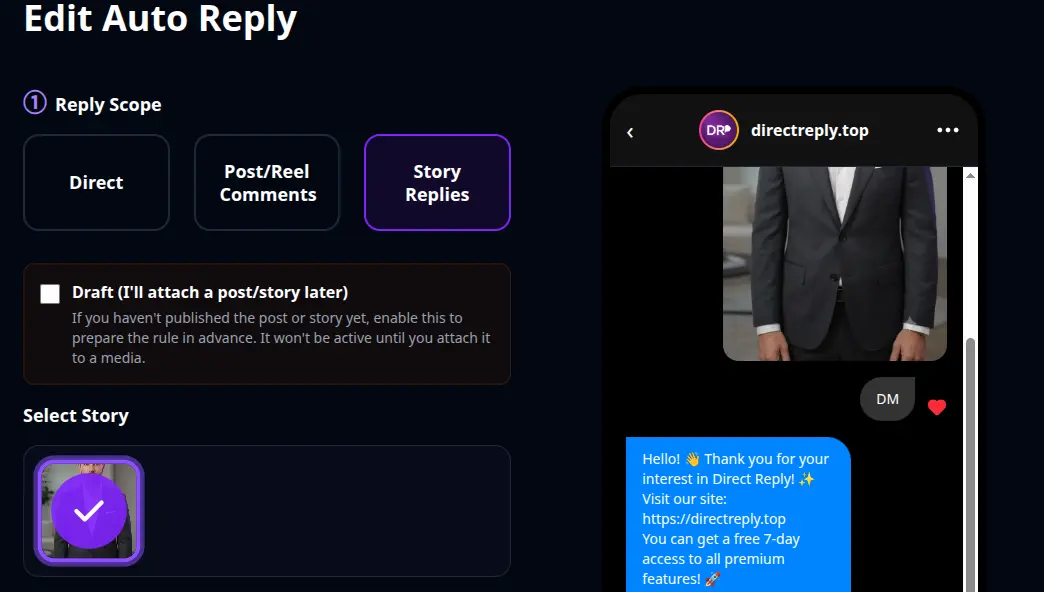
When someone replies to your story, Direct Reply can automatically respond based on the content of their reply — no manual work on your end.
Learn How to Set Up Auto Story Replies (5-Min Tutorial)
Example: Post a poll story: "Which product do you want to see next? Reply with your choice 👇" — anyone who replies gets a personalized DM based on what they wrote.
You can also configure Direct Reply to automatically like story replies — a small but meaningful acknowledgment that builds connection with your audience and encourages more engagement.
Follow Gate — Require a Follow Before Sending
Follow Gate lets you check whether a user follows your page before triggering the automated response. If they don't follow you yet, instead of the main response, they receive a message with a Follow button:
"Follow our page first to receive the exclusive link 🙏 [Button: Follow @yourbrand]"
This works exceptionally well for giveaways, lead magnets, and campaigns where growing your follower count is part of the goal. Instead of giving away value for free, you exchange it for a qualified new follower.
Comparison: Instagram's Native Auto Reply vs. Direct Reply
| Feature | Away Message (Instagram native) | Direct Reply |
|---|---|---|
| Keyword matching | ❌ | ✅ |
| Active 24/7 | ❌ (off-hours only) | ✅ |
| Sequential messages | ❌ | ✅ |
| Interactive buttons | ❌ | ✅ |
| Comment auto reply | ❌ | ✅ |
| Story reply automation | ❌ | ✅ |
| Follow Gate | ❌ | ✅ |
| Official Instagram API | ✅ | ✅ |
| Analytics & reporting | ❌ | ✅ |
| Cost | Free | Free plan + premium tiers |
Instagram DM Automation Best Practices
Proper DM management isn’t limited to just replying. Response speed, how you write messages, the use of keywords, and having a clear system for unanswered messages all matter a lot. In the article 7 Common Instagram DM Mistakes That Reduce Sales, we’ve covered the most frequent mistakes that can cause you to lose customers and explained the solution for each one.
1. Speed is your competitive edge
Every minute of delay increases the probability of losing a customer. Your target: respond to business-related DMs within 15 minutes. Automation makes this achievable at scale without hiring more staff.
2. Keep messages short and action-oriented
Instagram DMs are a chat interface — not email. Messages should be brief, clear, and include a single call-to-action. Long blocks of text get ignored or create friction.
3. Cover keyword variations
A rule for "price" should also cover: "cost", "how much", "pricing", "rate", "fee", "charge". Think about how different people — including non-native speakers — phrase the same question.
4. Keep automated messages current
If your prices change, update your automated response immediately. Sending outdated information through an auto-reply damages trust more than not responding at all.
5. Have a plan for unmatched DMs
Direct Reply works on keyword matching. Messages that don't match any keyword stay in your inbox for human follow-up. Set a regular schedule — twice daily is a good starting point — to review and respond to these manually.
However, managing Instagram DMs is not just about responding quickly. You also need to consider messaging limits, spam-like behavior, and the proper use of automation tools. For a more detailed explanation, read our article Instagram DM Limitations Explained (And How to Work Within Them) .
6. Make sure you have a Professional account
Instagram's API is only available to Business and Creator accounts. If you're still on a Personal account, see our guide on Instagram account types and how to switch.
Important API Limitations
A few things to be aware of when using any Official API-based automation tool:
- Rate limits: Instagram limits how many messages can be sent within a given period. Direct Reply handles rate limit compliance automatically.
- Comments can't be liked via API: Instagram's API doesn't support liking comments programmatically — that action is only available through the native Instagram app.
- Professional accounts only: API-based automation tools only work with Business or Creator accounts — not Personal accounts.
Frequently Asked Questions
Is using an Instagram DM automation tool safe for my account?
It depends entirely on the tool. Tools using the Official Instagram API — like Direct Reply — are explicitly permitted by Instagram and pose no risk to your account. Tools that ask for your Instagram password or simulate browser behavior carry serious risks, including account restriction or permanent ban.
What happens to DMs that don't match any keyword?
They stay in your inbox for manual follow-up. Direct Reply doesn't send any fallback auto-reply to unmatched messages — those need a human response. This is by design: it's better to respond personally than to send an irrelevant automated message.
Can I auto-reply to Message Requests?
Yes — Direct Reply responds to messages in both the Primary inbox and Message Requests.
Want to understand how Instagram's inbox sections work? Read our guide to Primary, General, and Message Requests on Instagram.
How many keywords can I set per rule?
Up to 10 keywords per automation rule. If you need to cover more variations, create multiple rules pointing to the same response message.
Does Direct Reply work for story replies and comments, not just DMs?
Yes — Direct Reply supports all three scopes: direct messages, post comments, and story replies. Each can have its own set of rules.
How do I connect my Instagram account to Direct Reply?
Via OAuth — the same mechanism as "Login with Google." You log into Direct Reply, click "Connect Instagram," approve the permission screen on Instagram, and you're done. Your Instagram password is never shared with Direct Reply.
Conclusion
Instagram DMs are no longer just a messaging feature — for businesses, they're a high-converting sales channel. The brands winning on Instagram aren't just posting great content; they're responding to every DM within seconds, 24 hours a day.
With the right setup — Professional account, smart keyword rules, and the Official API — you can:
- Respond to every business-related DM within seconds
- Turn post comments into a reliable lead-generation machine
- Handle more conversations without adding headcount
- Build a reputation for exceptional responsiveness
Start simple: create one rule for your most common question — pricing, availability, or your link — and watch the difference it makes from day one.
Set up your first Instagram auto reply — free, in under 10 seconds
Related Posts