Instagram Comment Auto Reply: Complete Setup Guide [2026]
![Instagram Comment Auto Reply: Complete Setup Guide [2026]](https://api.directreply.top/media/blog/featured/2026/08/7a6d332378ce4cb5b10ad9ab73ce855c.webp)
Why Comment Auto Reply Changes the Game
Every comment on your Instagram post is a buying signal. Someone stopped scrolling, engaged with your content, and typed something. But if you're managing a business account, you might get dozens — or hundreds — of comments per post.
Manual replies mean checking your phone constantly, missing comments during off-hours, and spending more time responding than creating. That's not a strategy — it's a treadmill.
This guide shows you how to set up Instagram comment auto reply using Direct Reply — so every relevant comment gets a response automatically, within seconds, even at 3 AM.
How Instagram Comment Auto Reply Works
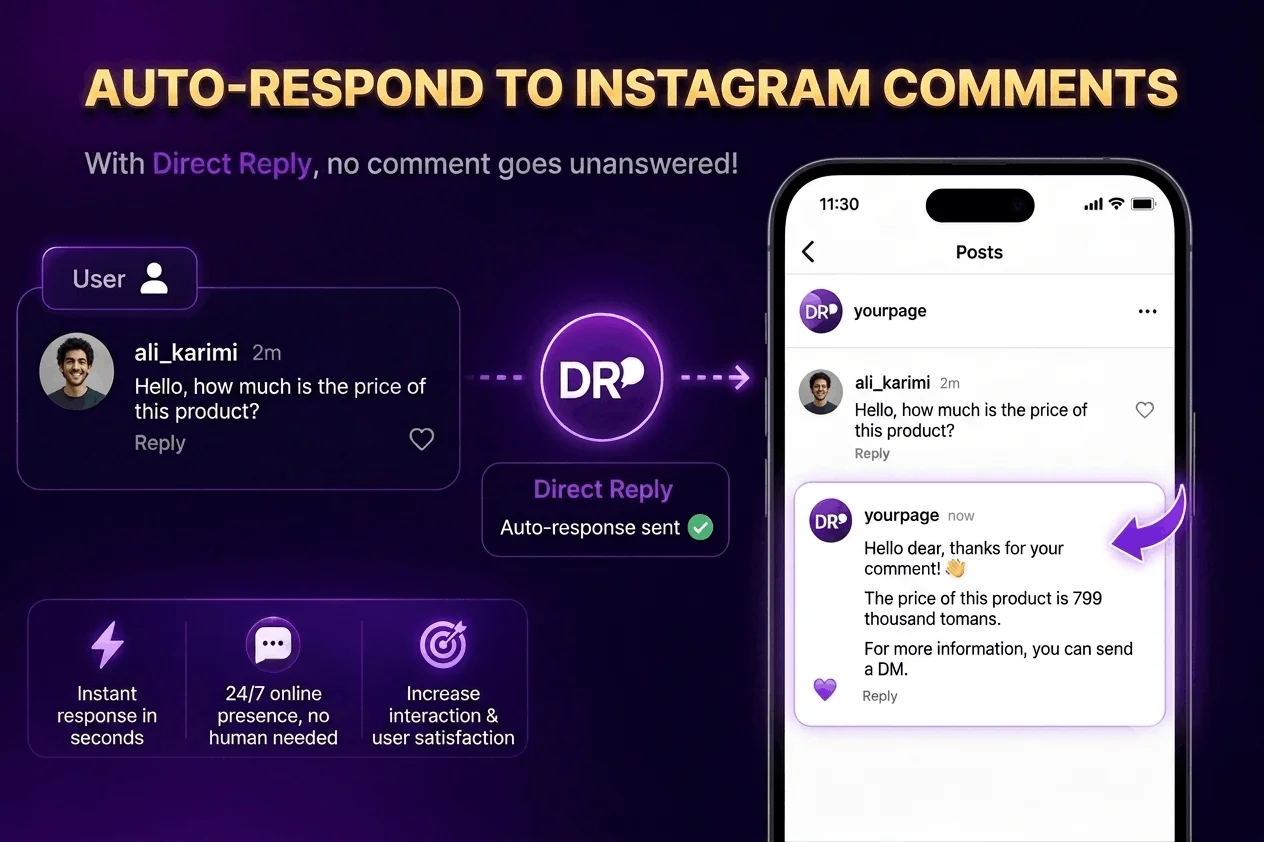
Through the official Instagram Messaging API, Direct Reply can:
- Monitor comments on your posts in real time
- Match keywords in the comment text
- Reply to the comment publicly (visible to everyone on the post)
- Send a private DM to the commenter automatically
You can use both actions together: a public reply that builds social proof, plus a private DM with your offer, pricing, or lead magnet. This combination drives both visibility and conversion.
Instagram's Built-in Tools and Their Limits
Instagram has some native tools, but none of them truly automate comment replies:
- Saved Replies: Template texts you manually select — you still have to tap "send"
- Away Message: Handles DMs only, not comments
- Quick Replies: Still require manual activation per conversation
For real automation that triggers on comment keywords without manual intervention, you need to use the official API.
Setting Up Comment Auto Reply in Direct Reply
Requirements
- Instagram Professional account (Business or Creator) — personal accounts don't have API access
- Direct Reply account with your Instagram page connected
- At least one Instagram post to target
Step 1: Create a New Auto-Reply Rule
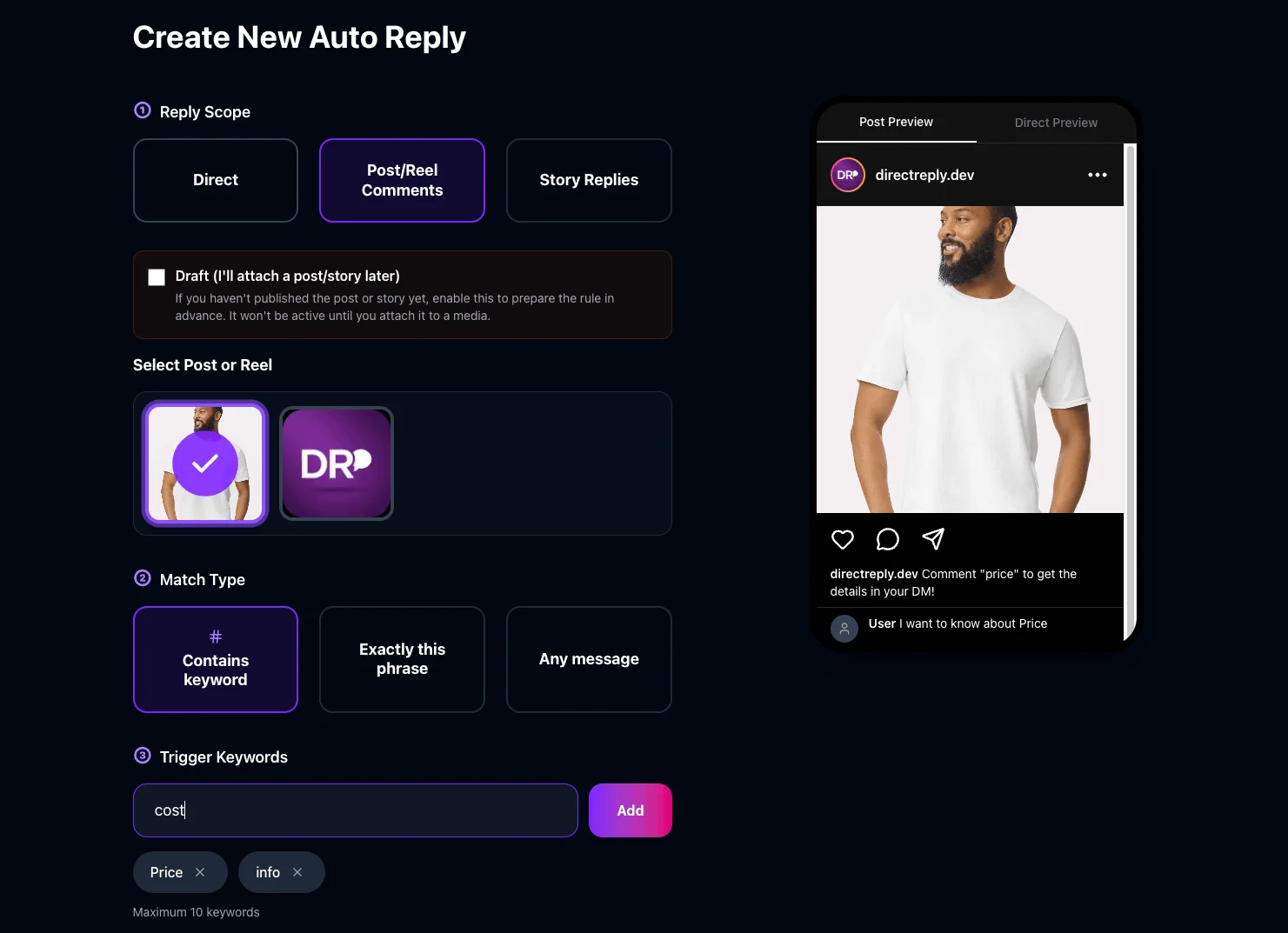
In your Direct Reply dashboard, go to Auto-Replies → Create New. Set Scope to Post Comment.
Step 2: Select Your Target Post
Direct Reply loads your recent posts from the API. Select the post you want to monitor. You can set different rules for different posts — a product launch post triggers different messages than a giveaway post. Each rule is tied to a specific post.
Step 3: Set Your Keyword Trigger
Choose how comments should match:
- Contains: Comment includes your keyword anywhere — most flexible and recommended for most cases
- Exact: Comment must match exactly — best for structured campaigns like "Comment INFO" or "Type SEND"
- Any comment: Reply to every comment on the post — ideal for giveaways or broad engagement campaigns
High-intent keywords for sales posts: price, how much, cost, buy, purchase, info, details, link, available, where to buy
Keywords for lead gen posts: send, more info, interested, yes, how, tell me
Keywords for giveaway posts: done, joined, entered, following, ✅
Step 4: Configure the Public Comment Reply (Optional)
Enable Reply to Comment to post a visible reply under each matching comment. Keep it brief — 1 sentence that signals to everyone watching that you're responsive. Example: "Sent you all the details in a DM! 🙌"
This public reply is social proof. Everyone who visits your post sees that you engage with your audience — which increases trust and often triggers more comments.
Step 5: Write Your DM Message
This is the private message that goes to the commenter. Make it feel personal and action-oriented. You can include:
- Product link or pricing page URL
- Detailed product specifications
- An exclusive discount code
- Your lead magnet download link
- A call to continue the conversation
Example for a product post: "Hey! Thanks for your comment 👋 Here's everything about [Product]: [link] — it's $X and ships in 2 days. Any questions? Reply here!"
Example for lead generation: "Hey! Here's the free guide I mentioned: [link]. Let me know if you have questions — happy to help."
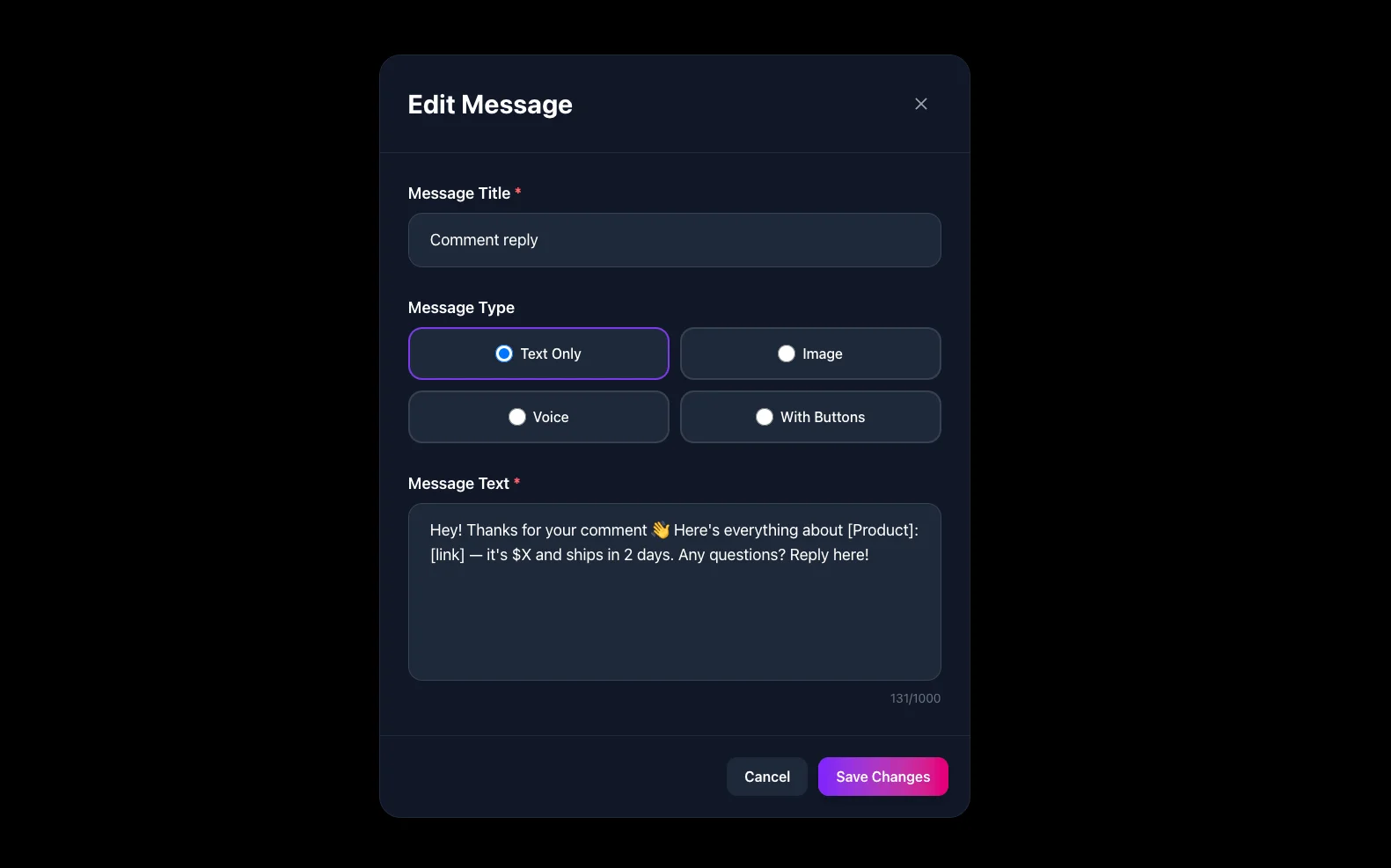
Step 6: Save and Test
Save your rule. Test it immediately: from a secondary account, comment on your post using your keyword. Within seconds you should receive both the public reply and a private DM.
Advanced Strategies That Drive Results
The "Comment for Coupon" Campaign
Post a product image with caption: "Comment DEAL25 to get your 25% discount code!" Set a rule: keyword = "DEAL25", DM = "Here's your code: SUMMER25 — valid for 48 hours. Use at checkout: [link] 🎉"
This creates urgency, drives comment volume (which boosts the post algorithmically), and converts engaged followers into buyers in a single automated flow.
Giveaway Automation
For giveaways requiring comments: set scope to Any Comment, send a DM confirming entry and reminding them to follow. Combine with Follow Gate to ensure only followers get confirmed — everyone else gets a "follow us first" message.
Lead Generation from Educational Content
Educational posts often trigger comments like "Can you share more?" or "How do I get started?" Set rules for these intent signals to automatically send your lead magnet, free resource, or booking link. Turn passive engagement into qualified leads without lifting a finger.
The Follow Gate Feature
Direct Reply's Follow Gate conditions your auto-reply on follower status. If the commenter doesn't follow your account, they receive a different message: "Follow us first and comment again to get the exclusive details!" Once they follow and re-comment, the main message triggers.
This converts commenters into followers before you give away your best content — growing your audience while generating leads at the same time.
Important Limitations
- No comment likes via API: Instagram's API doesn't allow automated comment likes. Direct Reply sends DMs and text replies, but cannot like individual comments — that's an Instagram API restriction, not a Direct Reply limitation.
- Unmatched comments get no auto-reply: If a comment doesn't match your keyword, no message is sent. Manual response is needed for those. To maximize coverage, add an Any Comment rule as a catch-all.
- One rule per post + keyword combination: You can't have two conflicting rules targeting the same post and keyword simultaneously.
- Professional accounts only: Personal Instagram accounts don't have Messaging API access.
Comment Auto Reply vs. DM Auto Reply: When to Use Which
| Feature | Comment Auto Reply | DM Auto Reply |
|---|---|---|
| Trigger | Comment on a specific post | Keyword in a direct message |
| Public response? | Yes (optional) | No |
| Private DM? | Yes | Yes |
| Algorithm boost? | Yes — more comments = more reach | No |
| Best for | Sales posts, giveaways, lead gen | Support, catalog requests, FAQs |
| Post required? | Yes — tied to a specific post | No — works on all DMs |
For a complete breakdown of all automation types — DMs, comments, and story replies — read the Complete Instagram DM Automation Guide.
FAQ
Does comment auto reply risk getting my account banned?
No. Direct Reply uses the official Instagram Messaging API with OAuth authorization — the same technology Meta approves for business tools. There's no automation abuse and no risk of account restrictions when using official API access.
Can I set up comment auto reply on old posts?
Yes. Direct Reply can monitor any post, including older ones. New comments on older posts still trigger your rules. This is useful for evergreen content that continues to generate comments over time.
What if the same person comments multiple times?
Each matching comment triggers the rule. If you want to limit responses to one per user, use more specific Exact keyword matching to reduce repeated triggers.
Does Creator account work, or only Business?
Both Business and Creator accounts support the Instagram Messaging API fully. Personal accounts don't have API access regardless of follower count.
Can I use emoji as keywords?
Yes — emoji keywords work perfectly. A keyword like "🔥" or "✅" or "❤️" is completely valid and can make campaigns feel more natural and fun.
Will commenters know the reply is automated?
The DM appears to come from your account — there's no "automated" label. The public comment reply also looks like a normal reply. Whether to disclose is up to you; many brands do (e.g., "Our bot sent you the details!") while others don't.
Conclusion
Instagram comment auto reply turns passive engagement into active pipeline. Every time someone comments with a keyword, they're signaling interest — and Direct Reply makes sure that signal never goes unanswered.
Set up your first comment auto-reply rule in under 5 minutes:
Related Posts