Difference Between Instagram Private, Public, Business, and Creator Accounts

What Are the Different Types of Instagram Accounts and Why Does Choosing the Right One Matter So Much?
Many people think that all you need to do is create a page and start posting. But the truth is, the type of account you choose acts like the engine of a car — choosing the wrong one will significantly slow down your page growth.
I have worked with many different pages over the years and have seen how switching to the right account type at the right time can completely change the game. Let’s examine all the types in detail and without unnecessary talk.
1. Private Account
This is the default personal account. Only people you approve to follow you can see your posts and stories.
Advantages:
- Very high privacy
- Suitable for ordinary people, family, and close friends
- Complete control over who can access your content
Disadvantages:
- Almost no visibility in Explore and search
- No access to Insights and statistics
- You cannot run ads
- No possibility to connect to automation tools like Direct Reply
- Almost useless for business purposes
2. Public Account
Everyone can see your content without needing to follow you. This is the base mode for all accounts, but without switching to a Professional mode (Business or Creator), it has many limitations — including no ability to connect to advanced tools like Direct Reply.
3. Business / Professional Account
The best choice for online stores, brands, services, and businesses.
Key Features:
- Full access to detailed analytics (Reach, Impressions, audience demographics)
- Ability to run ads directly from Instagram
- Contact buttons (Call, Message, Email, Location)
- Instagram Shopping and product tagging
- Connection to advanced automation tools like Direct Reply for smart automatic replies to DMs, comments, and stories
Important Note: A Business account cannot be private — it is always public.
4. Creator Account
This account type is designed for influencers, content creators, artists, and anyone building a personal brand.
Standout Features:
- Full access to trending music library for Reels
- Monetization tools (Subscriptions, Gifts, Badges in live)
- Organized inbox with separate tabs (Primary, General, Requests)
- More detailed analytics on content performance
- Access to Creator Marketplace for brand collaborations
- Full connection to third-party tools like Direct Reply for smart DM management and higher engagement
Quick Comparison Table of Instagram Account Types
| Feature | Private | Business | Creator |
|---|---|---|---|
| Can be private | Yes | No | No |
| Analytics & Insights | None | Excellent (audience & sales) | Excellent (content performance) |
| Running Ads | No | Full | Limited |
| Trending Music for Reels | Limited | Limited (commercial) | Full & Trending |
| Connection to Direct Reply & Automation Tools | No | Yes | Yes |
| Best For | Personal & Family | Stores & Businesses | Influencers & Content Creators |
How to Switch to a Business or Creator Account (Step by Step)
- Open the Instagram app (use the mobile version).
- Go to your profile (bottom right icon).
- Tap the three lines in the top right.
- Find “Your activity” or go directly to Account type and tools.
- Go to Account type and tools.
- Tap Switch account type.
- You will see the option Switch to Professional account → then choose Business or Creator.
- Select the appropriate category for your page and continue.
- If needed, connect your Instagram to a Facebook page (recommended for Business accounts).
- Confirm the changes.
Important Note: Switching from personal to professional usually happens instantly and no content is deleted.
Guide Images:
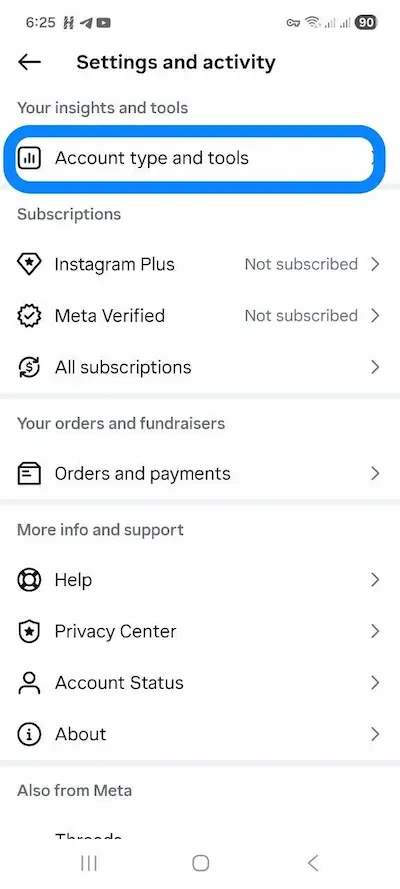
next:
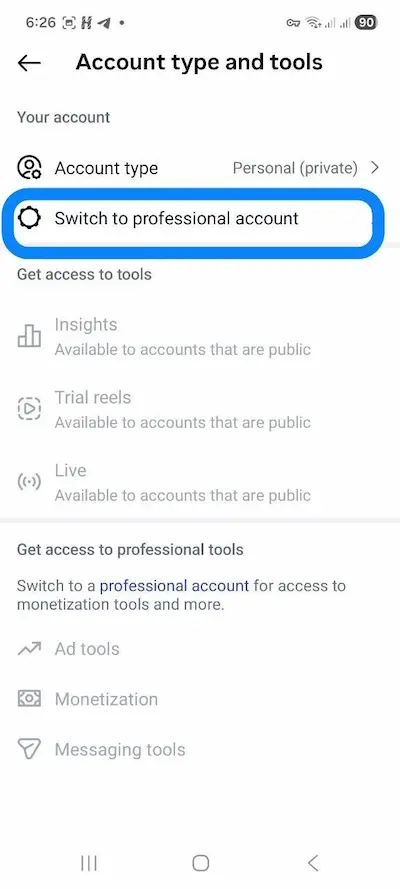
next:
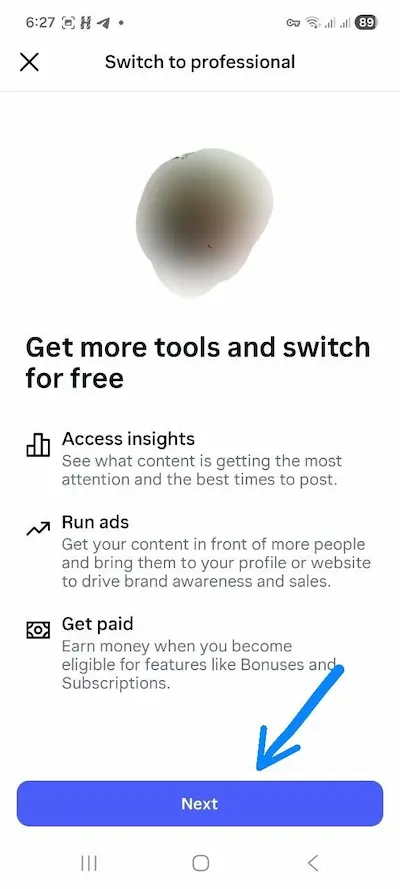
next:
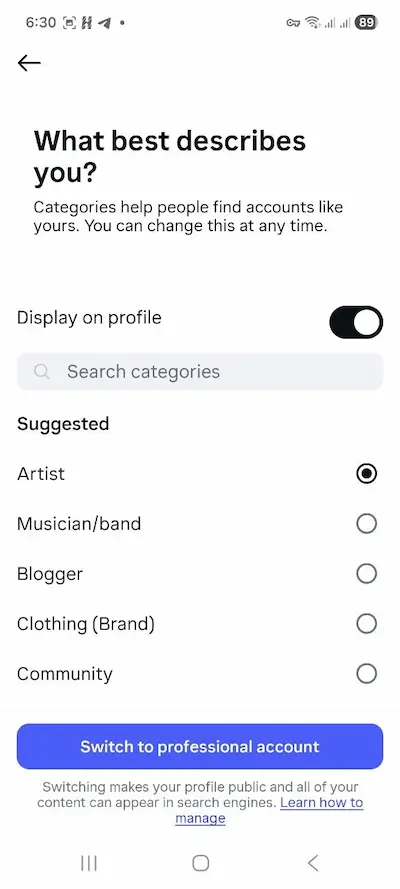
Final Tip
The account type is just a tool. High-quality content + smart engagement (like using automatic DM replies with Direct Reply) is what really drives your page to success.
If you have any questions about account settings or automation tools, feel free to message us or contact us through the website.