How to Auto Reply to Instagram DMs (Step-by-Step Guide)

You post a Reel. The comments start coming in: "How much?", "Send me the link", "Is this available?" — and you're asleep.
By morning, half those leads have already bought from a competitor who responded first.
This is the exact problem that Instagram auto reply solves. In this guide, I'll show you exactly how to set up automatic replies for your Instagram DMs — including keyword triggers, comment replies, and story mentions — so you never miss a lead again.
What Is Instagram Auto Reply?
Instagram auto reply is a system that automatically sends a pre-written message when someone DMs you a specific keyword, comments on your post, or replies to your story — without you having to lift a finger.
For example: someone comments "price" on your post → they instantly get a DM with your price list. No delay. No human needed.
This works through Instagram's official Messaging API, which means it's completely safe and Meta-approved. Unlike old-school bots that scraped Instagram (and got accounts banned), modern auto reply tools connect via official OAuth — the same way you log into apps with your Google account.
Does Instagram Have a Built-In Auto Reply?
Sort of — but it's very limited.
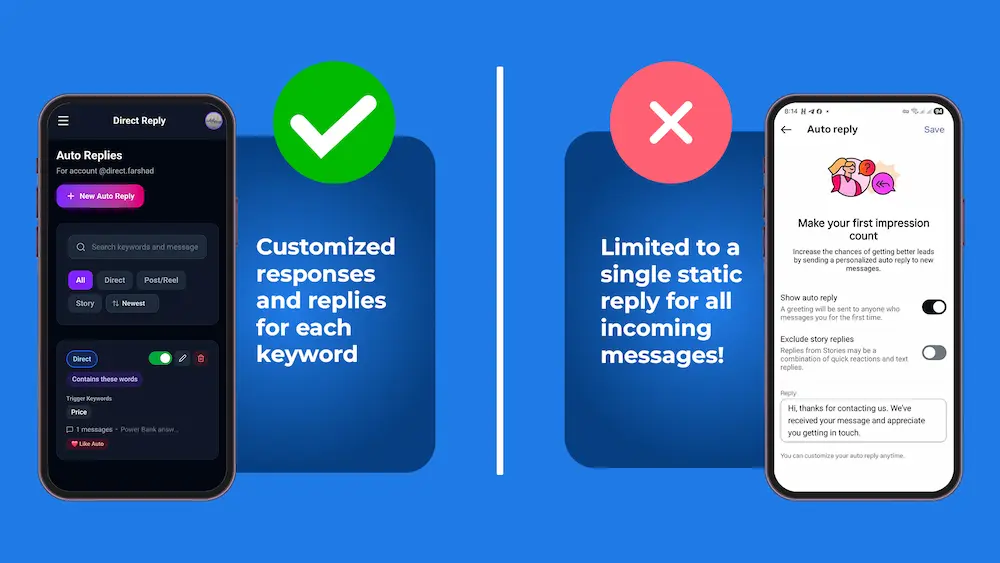
Instagram's native "Saved Replies" let you save message templates that you can manually send with a keyboard shortcut. It's faster than typing from scratch, but it still requires a human to trigger each reply.
Instagram also offers a basic "Away Message" for Business accounts, but it:
- Only sends when you're marked as "away"
- Sends the same message to everyone, regardless of what they asked
- Doesn't support keyword triggers
- Doesn't work for comments or story replies
For real automation — where specific keywords trigger specific replies — you need a third-party tool that connects to Instagram's official API.
How to Set Up Instagram Auto Reply for DMs (Step-by-Step)
There are two ways to do this. I'll cover both.
Method 1: Instagram's Native Away Message (Basic)
Instagram has a built-in Away Message feature available for Business and Creator accounts. To find it, go to your Professional Dashboard and look for Messaging Tools or Messaging controls. The exact path may vary slightly depending on your app version and region.
This is better than nothing, but it sends the same generic reply to every message. Your leads asking "is this in stock?" get the same reply as someone saying "I want to buy 10 units." Not ideal.
Method 2: Keyword-Based Auto Reply with Direct Reply (Recommended)
This is how serious Instagram businesses automate their DMs. Instead of one generic message, you set up keyword triggers — specific words that send specific replies.
Here's how to get started:
- Connect your Instagram account — Sign up at directreply.top and connect your Business or Creator account via Instagram's official login. Takes about 2 minutes.
- Create a message template — Write the reply you want to send. This can include text, buttons (like "See Pricing" or "Contact Us"), or an image.
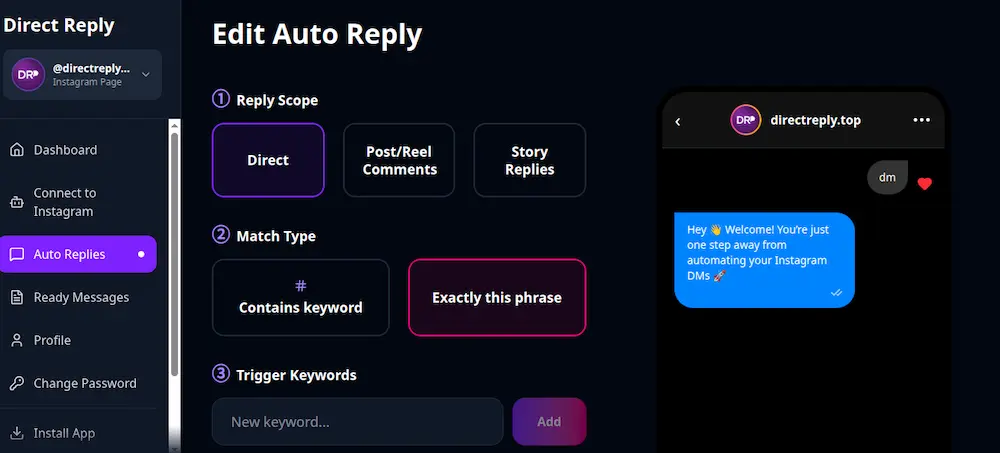
- Set up a trigger rule — Choose whether it fires for DMs, post comments, or story replies. Then set the keywords: "price", "cost", "how much" — whatever your customers actually type.
- Activate the rule — Toggle it on. From this point, every time someone sends a matching message, they get your reply instantly.
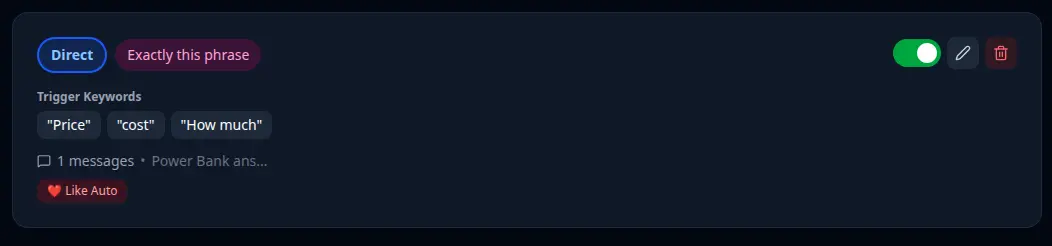
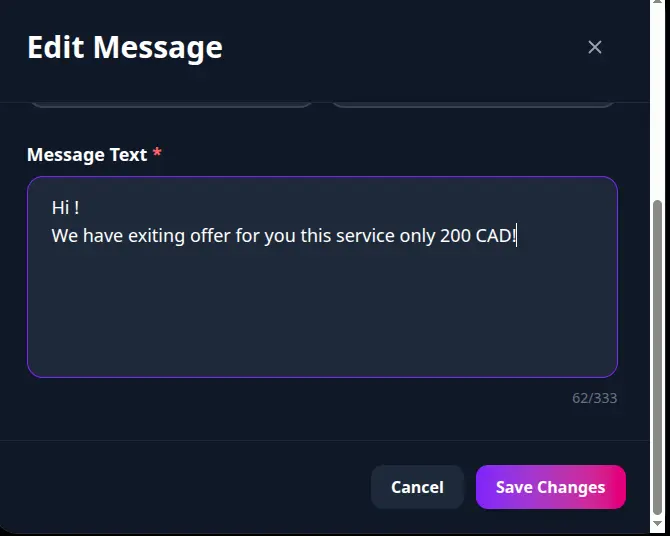
A keyword trigger rule in Direct Reply — when someone DMs "price", they get this reply instantly
The difference in practice: instead of "Thanks for messaging us, we'll reply soon," your customer gets the exact information they asked for, instantly, with a button to take the next step.
Auto Reply for DMs vs. Comments vs. Story Replies
Most businesses focus only on DMs, but Instagram's API lets you automate all three touchpoints:
Direct Messages (DMs)
The most common use case. Set keyword triggers for "price", "shipping", "available", "link", etc. When someone DMs you that keyword, they get your reply instantly.
Post Comments
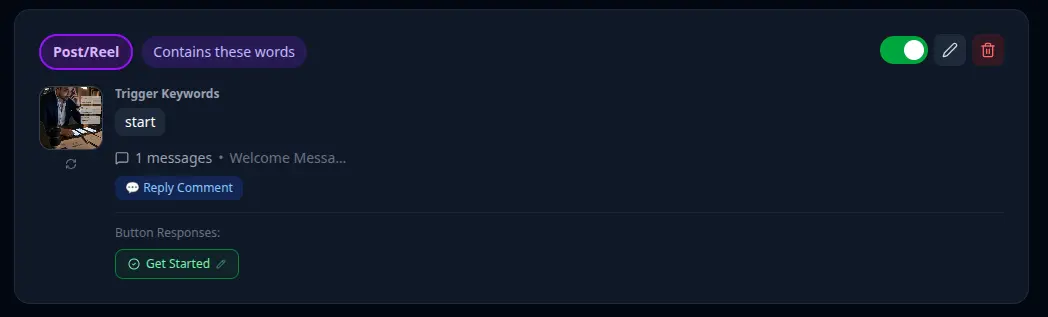
This is where things get powerful. When someone comments a keyword on a specific post, two things happen: they get a DM from you automatically, and (optionally) you reply to their comment publicly. This is the engine behind viral "Comment LINK to get the guide" posts — every comment triggers a DM, and the public replies make more people comment.
Story Replies
When someone replies to your story, you can auto-reply based on keywords or send a default message. This is great for story CTAs like "Reply INTERESTED to get the details."
What Keyword Triggers Should You Set Up First?
Based on what works across Instagram business accounts, these are the highest-value triggers to start with:
- "price" / "cost" / "how much" → Send your price list or a "Book a call" button
- "link" / "website" → Send your website URL or product page
- "available" / "in stock" → Confirm availability or collect contact info
- "discount" / "offer" / "promo" → Send your current deal
- "order" / "buy" → Send your order form or contact number
The key is to think about what your customers actually type, not what you wish they'd type. Check your existing DMs — the most common questions are your best triggers.
Does Instagram Auto Reply Work for All Account Types?
Auto reply through Instagram's official API requires either a Business or Creator account. Personal accounts don't have API access.
If you're still on a personal account, switching takes 30 seconds and you won't lose any followers or content: Profile → Settings → Account type → Switch to Professional Account.
If you don't know about Instagram account types read this article.
Is Instagram Auto Reply Safe?
Yes — as long as you use a tool that connects through Instagram's official Messaging API, not browser automation or password-sharing bots.
Direct Reply uses official OAuth. Instagram never sees your password. Meta has approved this type of integration. Accounts that get banned are almost always using tools that fake a browser session — that's a completely different (and risky) approach.
Common Mistakes to Avoid
- Too many keywords per rule — 3–5 keywords per rule is better than 15 vague ones. Focused triggers give cleaner results.
- Generic reply text — "Thanks for your message" is a wasted opportunity. Your auto reply should give them something useful immediately.
- No next step in the reply — Every auto reply should have a CTA: a link, a button, a question. Don't just answer and disappear.
- Forgetting story replies — Story mentions are often the highest-intent touchpoints. Someone who replied to your story is already engaged.
Frequently Asked Questions
Can I use auto reply on multiple Instagram accounts?
Yes. Direct Reply lets you manage multiple pages from one dashboard — useful if you run accounts for multiple brands or clients.
Will the auto reply feel robotic to customers?
Only if you write it that way. Write your reply the same way you'd write a real DM — casual, direct, helpful. Most customers can't tell the difference between a well-written auto reply and a human response sent in 30 seconds.
What if someone sends a message that doesn't match any keyword?
Direct Reply works on keyword matching. Messages that don't match any of your keywords won't get an automatic reply — they stay in your inbox for human follow-up. This keeps your automated replies precise and relevant rather than blasting a generic response at everyone.
Does it work 24/7?
Yes. That's the whole point. Your auto reply fires whether you're asleep, on vacation, or in a meeting. You stop losing leads to the gap between "they messaged" and "you saw it."
Start Automating Your Instagram DMs
Setting up your first keyword trigger takes about 5 minutes. Most businesses see the impact within the first few days — leads getting instant answers, comment-to-DM funnels running while they sleep.
If you're running a business on Instagram and still replying to every DM manually, you're leaving money on the table every night you're offline.
Related Posts