Understanding Your Instagram DM Inbox: Primary, Message Requests & Hidden

Why the Difference Between Primary and Message Requests Matters
Many Instagram business owners don't realize that their DM inbox has multiple sections — and important messages can end up outside the main inbox. If a customer ever said "I messaged you but never heard back," their message may have been sitting in Message Requests.
In this guide, you'll learn what each section of your Instagram DM inbox is, where messages typically go, and how to make sure no important message slips through — even with automation.
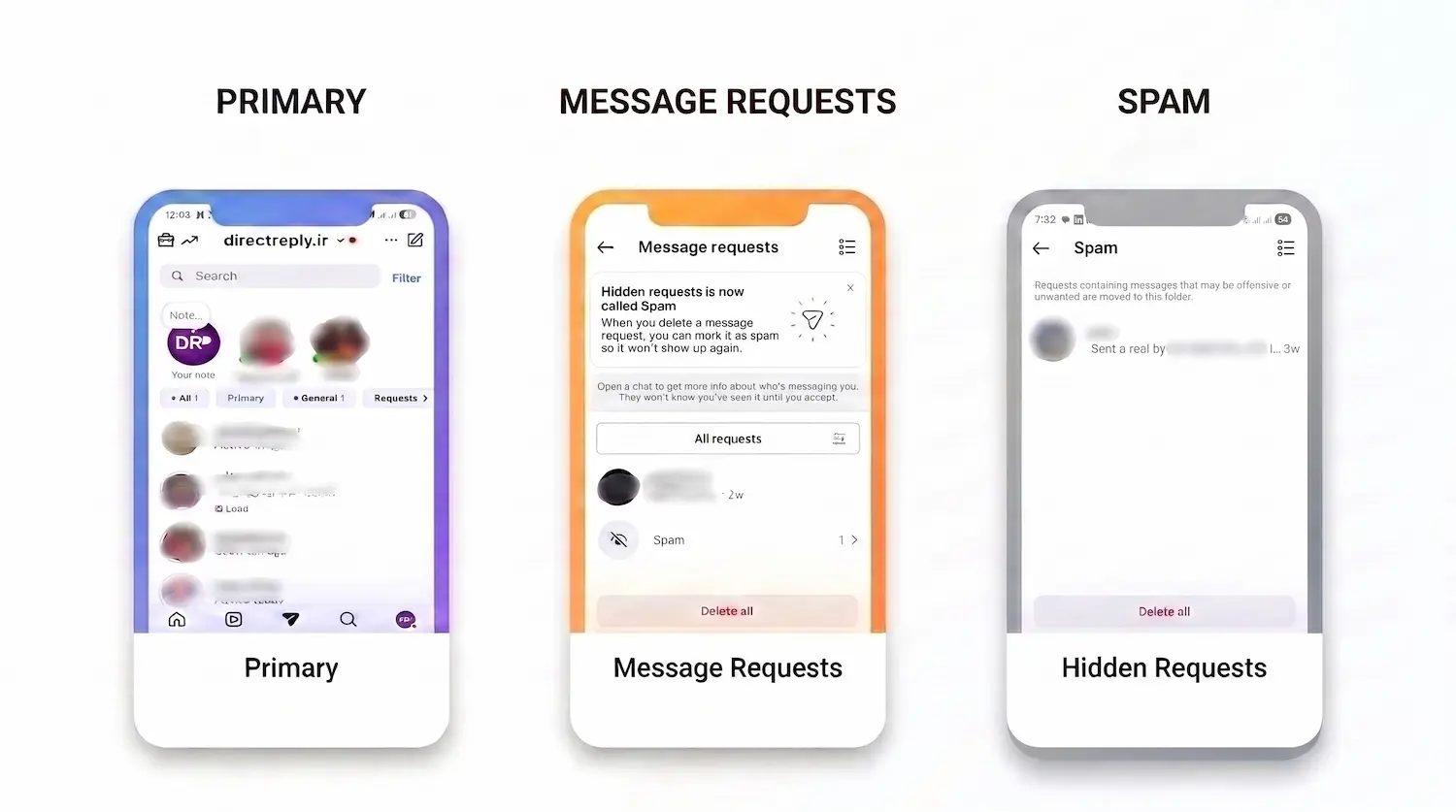
The Different Sections of Your Instagram DM Inbox
1. Primary
Primary is the main section of your DM inbox, where important conversations are typically displayed. For professional accounts, new messages from followers will generally appear in Primary.
This is the section you'll usually interact with most when you open your Instagram inbox, and where your main conversations are displayed.
2. General
General is a separate section designed to help you organize your conversations. You can move conversations that you don't want to keep in Primary to General, keeping your main inbox more organized.
This can be especially useful for business accounts that receive a large number of messages, allowing you to keep more important conversations in Primary while managing other conversations in General.
3. Message Requests
Messages from people who don't have an established connection with your account may initially appear in Message Requests. For example, a message from a non-follower may appear in Requests instead of your main inbox.
Message Requests are separate from your main inbox, and you can choose to accept, delete, or otherwise manage a request before continuing the conversation normally.
For business accounts, this section can be particularly important because a new user who has just discovered your content may send their first message through Message Requests.
4. Hidden Requests
Hidden Requests are part of Instagram's filtering system for message requests. Instagram may hide certain messages because they are potentially spam, scams, offensive content, or are affected by message filtering settings such as Hidden Words.
As a result, a legitimate message can sometimes end up in this filtered section as well. If incoming messages are important to your business, it's worth checking Hidden Requests from time to time.
What Goes Where?
| Sender Status | Typical Destination |
|---|---|
| Someone who follows your account | Primary ✅ |
| Someone who doesn't follow your account | Message Requests ⚠️ |
| Someone with no established follow relationship with your account | Message Requests ⚠️ |
| A message filtered by Instagram | Hidden Requests 🔒 |
| Story reply from a non-follower | Message Requests ⚠️ |
| Story reply from a follower | Primary ✅ |
Keep in mind that the exact location of a conversation can depend on the relationship between the two accounts, privacy settings, and Instagram's inbox management systems. The table above is a general guide, not a fixed rule that applies to every account.
How to Manage Message Requests Effectively
For business accounts, Message Requests can be an important source of leads — especially because they may include people who have just discovered your content and proactively reached out.
There are three main ways to manage these messages:
- Daily manual check: Open Message Requests every day and review new requests, replying when necessary. It's simple, but can become time-consuming for accounts with a high volume of messages.
- Manual request management: Accept relevant requests and delete or manage unwanted messages and spam. This works well for accounts with a small number of requests, but becomes harder as message volume grows.
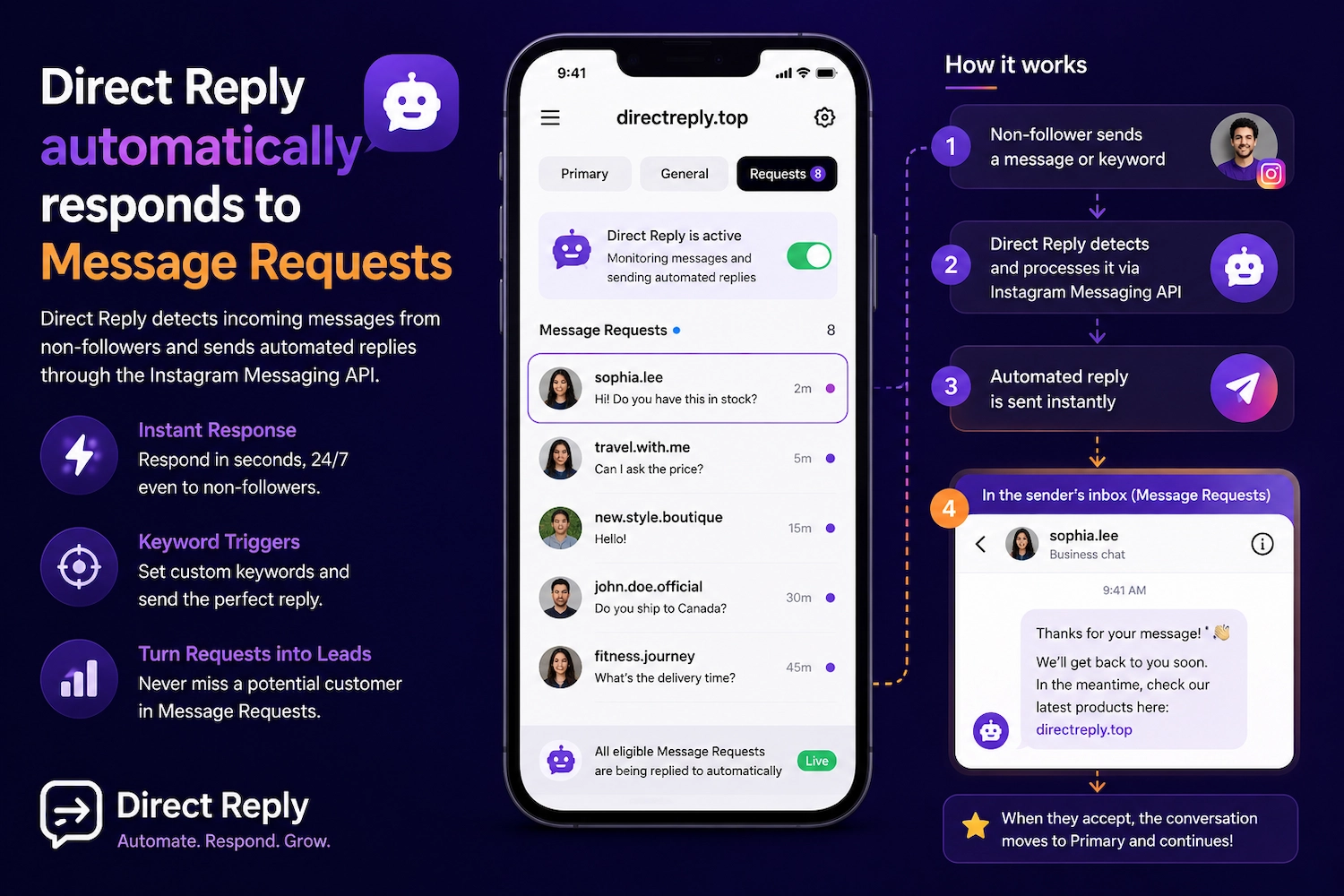
- Automate with Direct Reply: Automatically process and respond to incoming messages that are accessible through the Instagram Messaging API — without manually checking every message.
How Message Requests Affect DM Automation
When you use Direct Reply, the platform accesses incoming messages through the official Instagram Messaging API — including messages that are available through Message Requests.
This means:
- If a non-follower sends a message or keyword and that message is available through the API, Direct Reply can automatically respond based on your automation settings.
- The response is sent within the same conversation, while the conversation's status and location in the inbox remain subject to Instagram's rules and limitations.
- Any limitations that Instagram applies to Message Requests and messaging with non-followers are platform and API limitations, and Direct Reply cannot change those rules.
Follow Gate is a smart solution: With Direct Reply's Follow Gate, you can check whether a user follows your account before sending the main response. If they don't follow you, you can ask them to follow your account first and then continue the process.
For the complete automation guide, read the Complete Instagram DM Automation Guide.
How to Find Hidden Requests
If Instagram has filtered messages into Hidden Requests, you can review them from the message requests section. The exact location of this option may vary depending on your Instagram app version and account type.
If your account receives a large number of messages, it's a good idea to check this section from time to time, as legitimate messages can occasionally be filtered there.
FAQ
What happens if I decline a Message Request?
When you decline or delete a Message Request, the conversation does not move into your main inbox. Instagram generally does not notify the sender that you declined the request, although messaging behavior afterward can depend on the account and Instagram's rules.
Why did a real customer's message end up in Message Requests?
If the customer doesn't follow your account or there isn't an existing relationship that causes the conversation to appear in the main inbox, their message may be placed in Message Requests. The exact behavior depends on Instagram's messaging and inbox rules.
Can I automatically move Message Requests to Primary?
The location of a conversation in the inbox is managed by Instagram, and there is no simple Direct Reply setting that can force a conversation into Primary. Replying to a request can affect the conversation's status and location, but you shouldn't assume that every conversation will automatically move to Primary.
Does Direct Reply respond to Hidden Requests too?
No. Messages that Instagram places in Hidden Requests are not available to automation tools through the normal Instagram Messaging API flow. These messages need to be checked and managed manually.
How often should I check Message Requests?
With Direct Reply, eligible automated responses can be sent instantly. However, for messages that don't match your automation rules, it's still a good idea to check Message Requests regularly during your business hours.
Conclusion
Understanding the different sections of your Instagram DM inbox — Primary, General, Message Requests, and Hidden Requests — is an important first step toward professional DM management. For business accounts especially, you shouldn't rely only on the main inbox when important customer messages could be waiting in Requests.
With Direct Reply, incoming messages that are accessible through the Instagram Messaging API — including eligible messages in Message Requests — can be processed and answered automatically, within seconds, 24/7:
Related Posts